
DRMN Developers
Connect your system to DigiCMS
DigiCMS is DRMN's digital signage CMS. Another system can read a merchant's media, campaigns and tags through the integrations API, and upload media to it; people can also run the CMS from their AI tools over MCP.
Two ways in
Pick the right one first: system to system is the integrations API; a person working through an AI tool is MCP.
Integrations API (integration token dcmi_…) | AI tools (MCP, personal AI key dcms_…) | |
|---|---|---|
| For | Other systems: online shops, POS, reporting, partners | People who use Claude, ChatGPT, Cursor or similar tools to work in the CMS |
| Belongs to | The merchant; it keeps working when the person who made it leaves | A person's account; it stops when they leave the merchant |
| Who creates it, where | An owner or admin, in the CMS under Settings → Integrations | Each person, in the CMS under Account → AI (/account/ai) |
| What it can do | Only the scopes ticked; the only writes are uploading media and adding tags | What the person's role allows, except what AI may never do (issuing tokens, deleting tags…); publishing needs the person's confirmation |
| Address | https://cms.drmn.app/api/integrations/v1/… (REST, JSON) | https://cms.drmn.app/api/mcp (MCP) |
Getting started
1. Ask the merchant for an integration token
The merchant issues integration tokens; you don't apply for one. An owner or admin opens Settings → Integrations in the CMS, enters a name (such as the name of your system), ticks the scopes, picks how long it lasts and clicks Create token. The token is dcmi_ and 43 characters, and it is shown once only, so they copy it to you then.
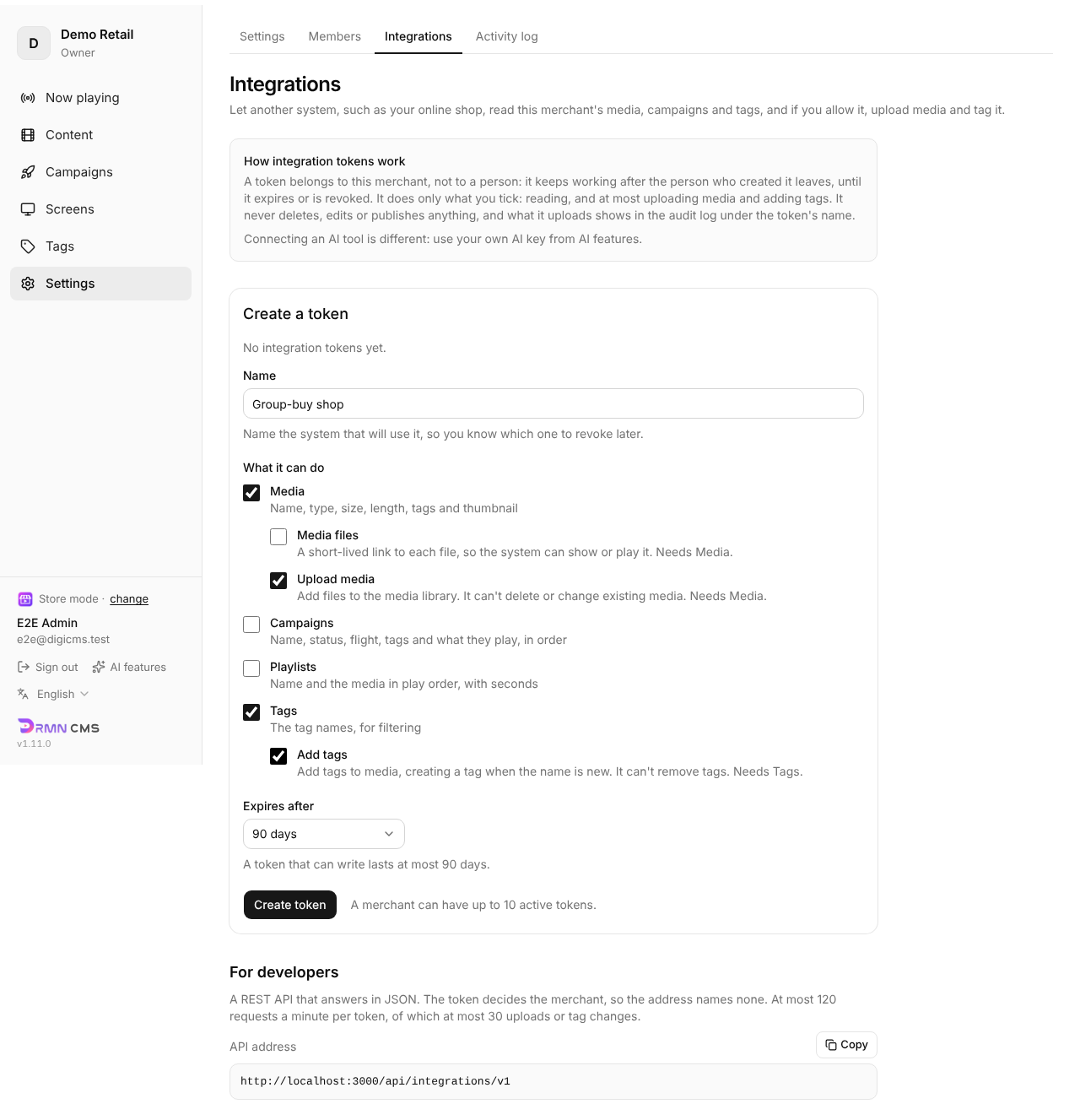
- The token belongs to the merchant, not to the person who created it; it keeps working when they leave.
- It stops working when it expires or is revoked, or while the merchant is suspended or its plan has ended.
- A merchant can have up to 10 active tokens.
- Treat it like a password: keep it in server-side configuration or a secret, never in a web page, an app or a repository.
2. Make your first call
Send Authorization: Bearer dcmi_… with every request. The URL never names a merchant: a token reads its own merchant's data only. Every answer is JSON.
export DIGICMS_INTEGRATION_TOKEN='dcmi_…'   # the token the merchant gave you
curl -s "https://cms.drmn.app/api/integrations/v1/media?limit=20" \
  -H "Authorization: Bearer $DIGICMS_INTEGRATION_TOKEN"
Scopes
A token does only what was ticked when it was created. Calling an endpoint without its scope gives 403, and the message names the missing scope.
| Scope | Endpoints | What |
|---|---|---|
media:read | GET /media, GET /media/{id} | Media: name, type, size, length, tags, thumbnail |
media:files | (the same, with media:read) | Adds fileUrl to media: a short-lived link to the file |
media:write | POST /media/uploads, POST /media/uploads/{id}/finalize (with media:read) | Upload media to the merchant's library |
campaigns:read | GET /campaigns, GET /campaigns/{lineageId} | Campaigns; one campaign includes what its screens play |
playlists:read | GET /playlists, GET /playlists/{id} | Playlists, in play order |
tags:read | GET /tags | Tags |
tags:write | POST /media/{id}/tags (with tags:read) | Add tags to media; adding only |
A token with media:write or tags:write lasts at most 90 days; a read-only token up to a year.
Uploading media
Files don't pass through the CMS: it gives you signed URLs and you PUT the file straight to storage. The flow is request upload → PUT → finalize, then tag if you like.
- Compute the file's SHA-256 (lower-case hex) and its size in bytes; for a video also read its length, width, height and codec. A 480-pixel-wide JPEG thumbnail is best (
hasThumbnail,thumbnailSize). - Make a UUID (v7 is best) as the file's
id. Sending the sameidagain is safe and never adds a second item: on a network error, retry with the sameid. POST /media/uploadsand getupload.urlandupload.headers.- Within 15 minutes, PUT the file to
upload.urlwith every header inupload.headers, unchanged (they are part of the signature). Do the same for the thumbnail withthumbnailUpload. POST /media/uploads/{id}/finalize. The CMS checks that the file arrived with the declared size, and the item becomes ready to play.
# 1. Start the upload: your own id, the file's size and SHA-256
curl -s -X POST https://cms.drmn.app/api/integrations/v1/media/uploads \
  -H "Authorization: Bearer $DIGICMS_INTEGRATION_TOKEN" \
  -H "Content-Type: application/json" \
  -d '{"id":"0192f0c4-7a3c-7b1d-9e2f-3a4b5c6d7e8f","name":"Autumn menu","fileName":"autumn-menu.jpg",
       "mimeType":"image/jpeg","fileSize":245760,"checksum":"9f86d0…","width":1920,"height":1080}'

# 2. PUT the bytes to upload.url, with every header in upload.headers, unchanged
curl -sS -f -X PUT --data-binary @autumn-menu.jpg "$UPLOAD_URL" \
  -H "content-type: image/jpeg" -H "content-length: 245760"   # …and the rest of upload.headers

# 3. Finalize: the item becomes ready and is returned as GET /media/{id} shows it
curl -s -X POST https://cms.drmn.app/api/integrations/v1/media/uploads/0192f0c4-7a3c-7b1d-9e2f-3a4b5c6d7e8f/finalize \
  -H "Authorization: Bearer $DIGICMS_INTEGRATION_TOKEN"

# 4. Tag it, e.g. with the campaign it is for
curl -s -X POST https://cms.drmn.app/api/integrations/v1/media/0192f0c4-7a3c-7b1d-9e2f-3a4b5c6d7e8f/tags \
  -H "Authorization: Bearer $DIGICMS_INTEGRATION_TOKEN" \
  -H "Content-Type: application/json" \
  -d '{"add":["Autumn","Group buy"]}'
What POST /media/uploads returns:
{
  "mediaId": "0192f0c4-7a3c-7b1d-9e2f-3a4b5c6d7e8f",
  "duplicateOf": null,
  "upload": { "url": "https://…", "headers": { "content-type": "image/jpeg", "content-length": "245760", "…": "…" } },
  "thumbnailUpload": null,
  "warnings": []
}duplicateOfis notnull: the merchant already has this exact file,mediaIdis that item, and there is nothing to upload or finalize.warnings: the video may stutter on the merchant's screens (resolution, bitrate, codec). They never block the upload; pass them on to the merchant.- Images (
image/jpeg,image/png,image/webp) up to 50 MB; videos (video/mp4,video/webm) up to 2 GB. - Uploads count toward the merchant's storage; when it is full you get 409 with
code: "storage_quota_exceeded". - The merchant's activity log records which token (name and last four characters) uploaded what.
Paging and filters
The list endpoints (/media, /campaigns, /playlists, /tags) take:
| Parameter | Meaning |
|---|---|
limit | Items per page, 1–200, default 50 |
cursor | The previous page's nextCursor; a null nextCursor means the last page |
q | Text search, ignoring case. Media match name and description; the others match the name |
tag | A tag id from GET /tags, on /media and /campaigns only. Repeat it to require every tag listed |
An unknown or malformed parameter gives 400; nothing is silently ignored.
Errors
Every error has the same shape: error is a fixed code and message is for people. Write endpoints may add code, which says which reason behind the status it is.
{ "error": "conflict", "message": "plan limit reached (storage 1950/2000 MB)", "code": "storage_quota_exceeded" }| Status | error | When |
|---|---|---|
| 400 | invalid_request | A query parameter or the body is not valid: not JSON, a required field missing |
| 401 | unauthorized | No token, an unknown, expired or revoked one, or the merchant is suspended or its plan has ended |
| 403 | forbidden | The token lacks the endpoint's scope; or the merchant's plan does not allow it (code: "plan") |
| 404 | not_found | Not found, or not this merchant's (the two look the same) |
| 405 | method_not_allowed | Wrong method: reads take GET, writes take POST (see the Allow header) |
| 409 | conflict | storage_quota_exceeded: the merchant's storage is full; id_conflict: the id is another item's |
| 413 | payload_too_large | The body is larger than 16 KB |
| 422 | unprocessable | Not accepted: wrong file type or size, finalizing before the PUT, asking to remove tags… |
| 429 | rate_limited | Over the rate limit; see the next section |
| 500 | internal | Something went wrong on our side; try again later |
Rate limits
At most 120 requests a minute per token; writes (the three POSTs) are counted on their own, at most 30 a minute. Over the limit you get 429, and the Retry-After header says how many seconds to wait.
- Sync on a schedule, for example a list every 1–5 minutes, rather than calling the API on every page view.
- Thumbnail and file links stop working after 15 minutes: fetch fresh ones before showing them, or keep your own copy.
- Upload many files one at a time, and on 429 wait for
Retry-After.
Versioning
/api/integrations/v1only grows: new fields, endpoints and scopes are added in place; nothing is renamed, removed or given a new meaning.- So ignore fields you don't know rather than failing on them.
- A change that would break clients gets a new
/v2, and/v1keeps working for a while after.
AI tools (MCP)
When a person wants to run the CMS from an AI tool such as Claude, ChatGPT or Cursor (scheduling in a conversation, sorting media, reading play logs), use MCP, not an integration token.
- Each person creates their own AI key (
dcms_…) in the CMS under Account → AI (/account/ai). - In the AI tool, add the MCP server
https://cms.drmn.app/api/mcpwith that key. - The AI can do what the person's role allows; publishing and screen settings need the person's confirmation, and some things AI may never do.
The CMS pages are the source of truth for setup and the tool list (no sign-in needed):
- Setup steps and snippets for each tool
- Tool reference: the same list as MCP
tools/list, always in step with the live server - For agents to read: llms.txt, install.md
OpenAPI file
The full definition is openapi.json (OpenAPI 3.0): import it into Postman or Insomnia, or generate an SDK from it. The API reference is built from it.
There is no try-it console: calling the API from a browser would leave the token there. Use the curl examples instead.